Server-Side Tracking for GA4: Why It Matters and How to Set It Up
Client-side GA4 loses 20–40% of data to ad blockers and browser restrictions. Server-side tracking recovers that data. Here’s how it works and when it’s worth it.
Standard GA4 implementation sends tracking events from the visitor’s browser to Google’s servers. This client-side approach is simple to implement but has an increasingly significant problem: ad blockers, intelligent tracking prevention (ITP) in Safari and Firefox, and privacy-focused browsers block or restrict client-side JavaScript tracking tags. Estimates for how much GA4 data is lost to these restrictions range from 20% to 40%, depending on the audience. For sites with a tech-savvy, privacy-conscious, or adblock-heavy audience, the loss is closer to 40%.
Server-side tracking moves the data collection step from the visitor’s browser to your own server, sending events to Google from a first-party endpoint that isn’t blocked by ad blockers or browser privacy features. The result is more complete data — and with iOS 17’s further restrictions on cross-site tracking, the gap between server-side and client-side accuracy is widening each year.
The Short Version
Client-side GA4 loses 20–40% of events to ad blockers and browser privacy restrictions. Server-side tracking routes events through your own first-party domain before forwarding to Google, recovering most of that gap. It requires a server-side GTM container, cloud hosting (roughly £20–150/month depending on traffic), and a subdomain on your own site for true first-party context. Worth it for sites with ad-blocker-heavy audiences or decisions that depend on accurate conversion data; often not worth the complexity for smaller, lower-risk sites.
Table of Contents
| Dimension | Client-side GA4 | Server-side GA4 |
|---|---|---|
| Data completeness | 60–80% of true traffic | 85–100%, depending on audience |
| Setup complexity | Low — standard GTM web container | Higher — needs a server container and hosting |
| Ongoing cost | None beyond standard GTM | £20–150/month hosting, depending on traffic |
| Resilience to ad blockers | Low | High, via first-party domain |
| Best suited for | Small sites, low-stakes data | Sites where conversion accuracy drives decisions |
How Server-Side Tracking Works
In a client-side GA4 setup: the visitor’s browser loads your page → the browser executes the Google Tag Manager (GTM) container → GTM fires the GA4 tag → the GA4 tag sends a hit to Google’s servers. Ad blockers intercept the GTM request or the GA4 hit and block it.
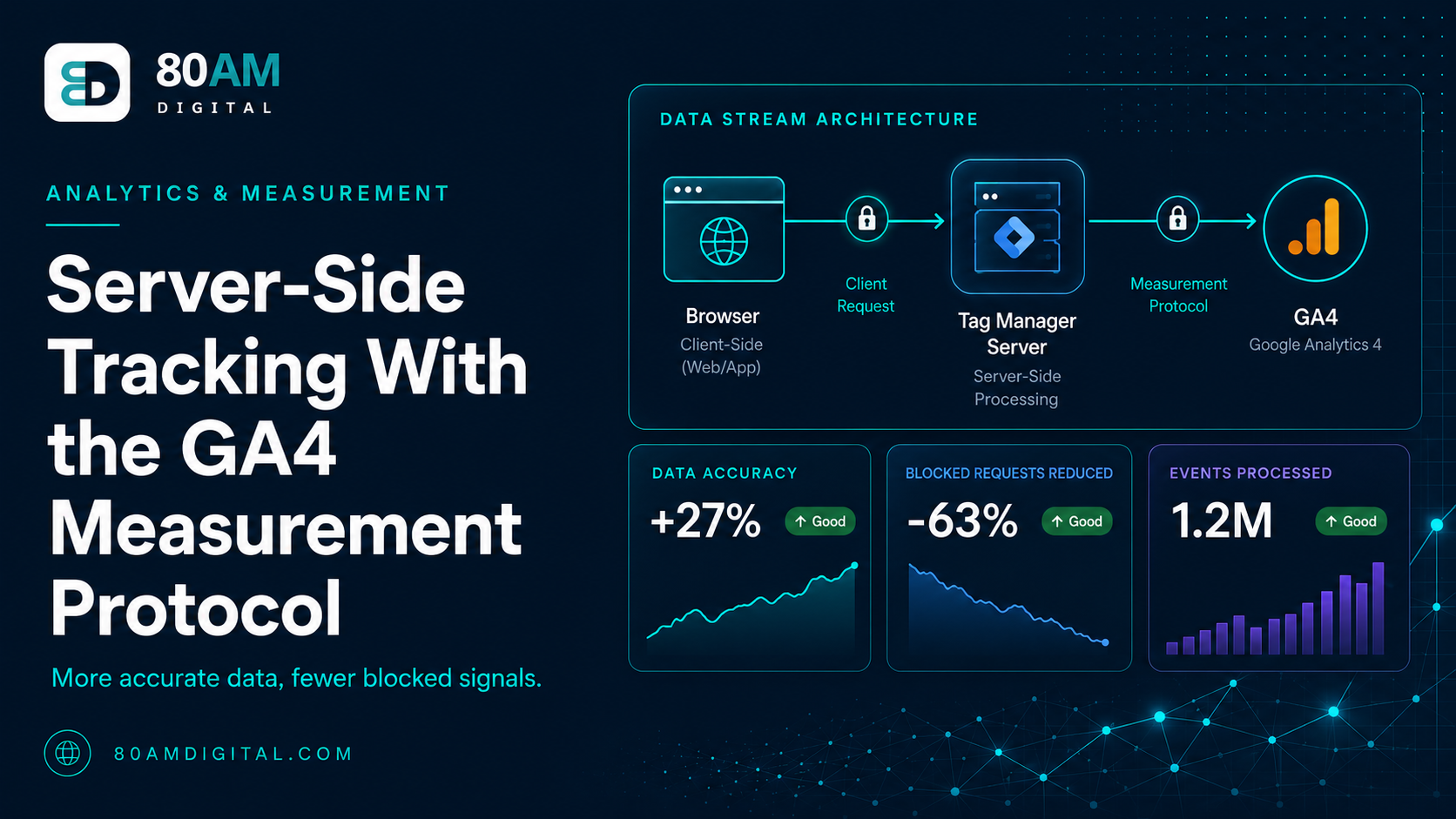
In a server-side GTM setup: the visitor’s browser loads your page → the browser sends events to your server-side GTM container (hosted on your domain) → your server-side container forwards the events to GA4. Because the event goes from the visitor’s browser to your own domain (first-party), ad blockers that allow first-party requests don’t block it. The final forwarding step (from your server to Google) also isn’t blocked because it happens server-to-server, outside the browser.
What You Need to Implement Server-Side Tracking
- A server-side GTM container: Google Tag Manager offers a server container type (separate from the web container). You need both: the web container sends events to the server container; the server container processes and forwards them to GA4.
- A cloud server to host the server-side container: Google Cloud Run, AWS, or DigitalOcean work. Google Cloud is the easiest setup via the GTM server container wizard. The server runs 24/7 and adds a hosting cost (typically £30–120/month depending on traffic volume).
- A subdomain on your own domain: The server-side container should be served from a subdomain of your site (e.g., `data.yourdomain.com`) to ensure first-party context. Using Google’s default tagging.example.com endpoint doesn’t provide the first-party benefit.
- Updated web container configuration: Your existing GTM web container needs to be configured to send events to the server container URL rather than directly to GA4. The GA4 Configuration tag in your web container points to the server container endpoint.
When Server-Side Tracking Is Worth the Cost
The added complexity and hosting cost are worth it when:
- Your audience has high ad blocker adoption (tech, developer, privacy-focused communities)
- Your decisions depend on accurate conversion data (paid advertising, SEO investment decisions based on organic conversion rates)
- You need accurate revenue attribution from ecommerce purchase events
- You’re running remarketing campaigns that depend on complete audience data
For smaller sites with lower-risk audiences and less reliance on precise conversion data, client-side GA4 with consent mode v2 is a reasonable approach. The data gap is real but may not justify the implementation complexity and ongoing cost until the site reaches a scale where data accuracy meaningfully changes decisions.
For the broader GA4 measurement setup, see GA4 for SEO. For how conversion event accuracy affects SEO reporting, see conversion events that tie to revenue.
A Worked Example
A B2B developer tools company suspected its GA4 conversion data was understating performance — internal CRM numbers showed roughly 30% more sign-ups than GA4 was reporting as conversions, and the audience (developers, many running ad blockers and privacy extensions by default) was an obvious candidate for high data loss.
The team set up server-side GTM on Cloud Run with a dedicated first-party subdomain, running it in parallel with the existing client-side implementation for four weeks to quantify the actual gap before fully switching over. The parallel run confirmed a 34% under-count in client-side GA4 relative to the server-side numbers, closely matching the CRM discrepancy that had originally raised the question.
After switching primary reporting to the server-side data, the team’s organic conversion rate — previously calculated using the under-counted client-side numbers — increased by roughly a third overnight, with no actual change in site performance. This materially changed the calculated ROI of the SEO programme in the next budget review, simply by correcting a measurement gap rather than improving anything about the site itself.
Frequently Asked Questions
Better Data Changes Better Decisions
Analytics decisions made on data that’s 20–40% incomplete aren’t just imprecise — they’re systematically biased. If your client-side GA4 under-reports conversions by 30%, your organic search conversion rate looks worse than it is, your SEO investment case looks weaker than it should, and your attribution to paid channels is inflated (because ad platforms use their own conversion tracking, which doesn’t have the same blocking problem). Server-side tracking is about getting the accurate picture on which real business decisions rest.
If you’d like help evaluating and implementing server-side tracking for your site, get in touch.