JavaScript SEO: Making Sure Google Renders Your Content
If Google can’t render your JavaScript, it can’t index your content. Learn how rendering works and how to make JS-heavy pages reliably crawlable.
Table of Contents
Google can execute JavaScript — but not reliably, not immediately, and not on every page. Sites built on JavaScript frameworks like React, Next.js, Vue, or Angular introduce an extra step between the server and the search engine: Googlebot must first download the HTML, queue the page for rendering, execute the JavaScript, and then index the resulting content. That queue can introduce delays of days or weeks. Content that only exists in the rendered version of a page — not in the raw HTML — may be indexed late or not at all.
This matters practically: if your navigation, body content, internal links, or meta tags are injected by JavaScript rather than present in the server-side HTML, they may not be available to Google when it first crawls the page.
The Short Version
- Google crawls JS-heavy pages in two waves — raw HTML first, rendered content second, sometimes days or weeks later.
- Server-Side Rendering and Static Site Generation are SEO-safe by default; pure client-side rendering carries the highest indexation risk.
- At minimum, your H1, meta tags, canonical, critical internal links, and structured data should exist in the raw server-side HTML.
- Use View Page Source vs. Inspect Element, or Search Console’s URL Inspection tool, to see exactly what Google can and can’t see without rendering.
How Google handles JavaScript rendering
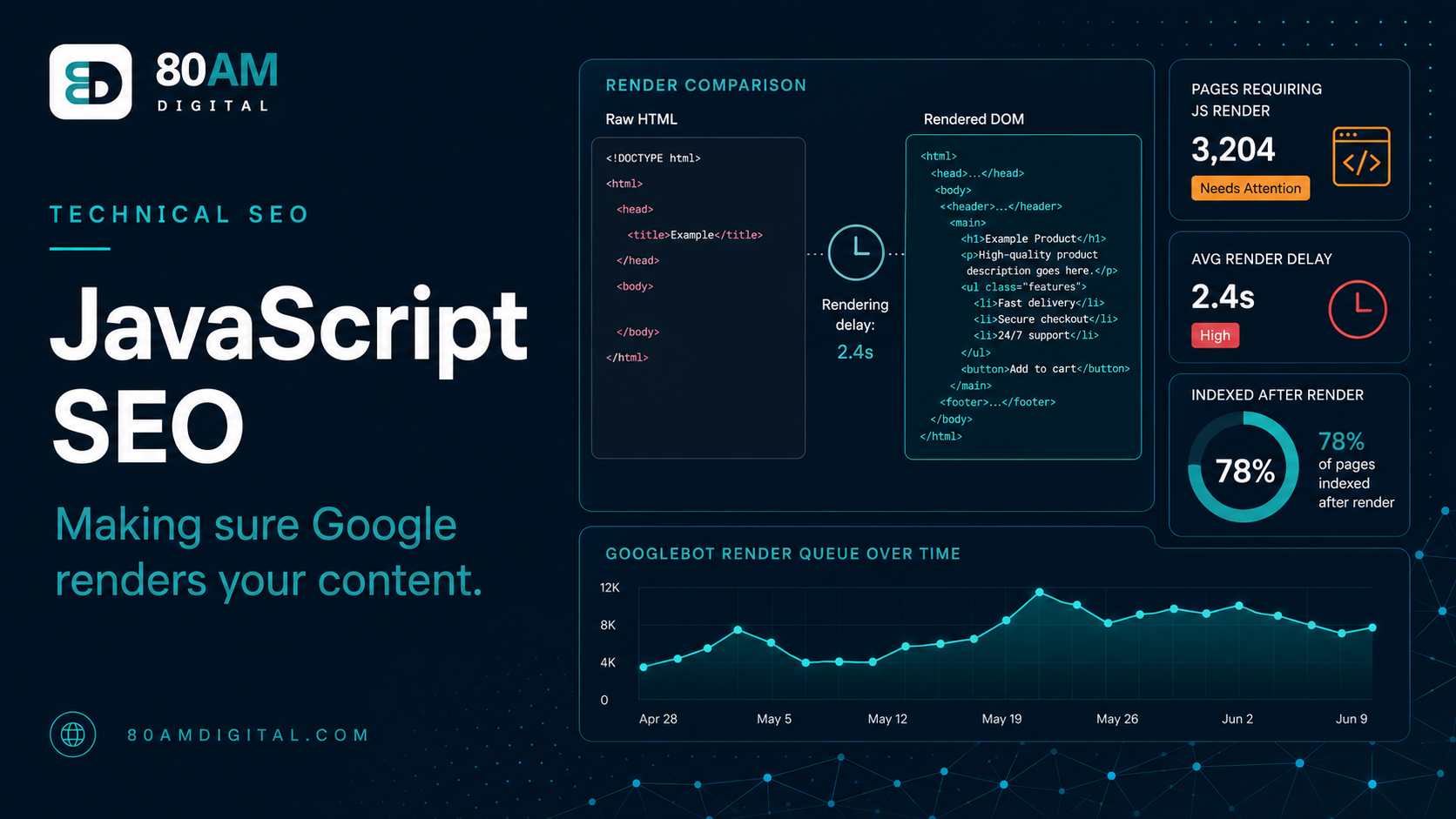
Google uses a two-wave crawl process for JavaScript-heavy pages. The first wave: Googlebot requests the URL and receives the raw HTML. It indexes whatever is present in that HTML immediately. The second wave: the page is queued for rendering with Google’s Web Rendering Service (WRS), which runs a headless Chromium browser to execute the JavaScript and produce the fully rendered DOM. The second wave can happen days or weeks after the first.
The practical consequence: if your site relies on client-side rendering (CSR) — where the server sends a nearly empty HTML shell and JavaScript builds the page in the browser — Google may index an empty or near-empty version of your page until the rendering queue catches up. For sites where the content changes frequently, the rendered version may always lag behind the live version.
Rendering strategies and their SEO implications
Each rendering approach trades off implementation effort against how quickly and reliably Google sees your content:
| Strategy | How it works | SEO risk | Best for |
|---|---|---|---|
| Client-Side Rendering (CSR) | Server sends a minimal HTML shell; JavaScript builds all content in the browser | Highest — meta tags and links may not exist in raw HTML | Internal tools, logged-in app views (not pages you want indexed) |
| Server-Side Rendering (SSR) | Server executes the JavaScript and sends fully rendered HTML on every request | Low — Google sees the same content as the user without rendering | Product pages, category pages, frequently changing content |
| Static Site Generation (SSG) | HTML pre-rendered at build time and served as static files | Lowest — complete HTML with zero rendering delay | Blog posts, marketing pages, content that rarely changes |
| Incremental Static Regeneration (ISR) | Statically rendered but regenerated on a schedule or on-demand | Low — same benefits as SSG with periodic refresh | Large sites with semi-static content |
How to diagnose JavaScript rendering problems
The fastest check: use Google Search Console’s URL Inspection tool on a page you’re concerned about. Select “Test Live URL” and then view the rendered screenshot. If the rendered version shows your content correctly, Google can see it. If the rendered version is blank or shows a loading state, you have a rendering problem.
- View Page Source vs Inspect Element: Right-click → View Page Source shows the raw HTML Google receives in the first wave. Right-click → Inspect Element shows the fully rendered DOM after JavaScript runs. If critical content (headings, body text, links) appears in Inspect but not in View Source, it’s JavaScript-rendered and may face indexation delays.
- Screaming Frog rendering comparison: Screaming Frog can crawl pages in both non-JavaScript mode (raw HTML) and JavaScript-rendered mode. Comparing the two crawls shows exactly which content, links, and meta tags are only present after JavaScript execution.
- Search Console Coverage report: Pages listed as “Crawled, currently not indexed” or consistently missing from the index despite being linked are candidates for rendering investigation.
What to fix first
If moving to SSR is a large engineering lift, prioritise making the most critical SEO elements available in the server-side HTML even if the rest of the page is client-side rendered. At minimum, the following should be present in the raw HTML response:
- The page’s H1 and primary heading structure
- The meta title and meta description (in the <head>)
- The canonical tag
- Critical internal links (especially navigation and links to important pages)
- Structured data markup
Body content that is client-side rendered will still be indexed — just on a delay. But if the meta tags and canonical signals are only available after JavaScript rendering, Google may make indexation decisions based on incomplete signals during that first-wave crawl.
For the full technical audit framework, see the SEO audit checklist. For structured data specifically, see schema markup for AI visibility.
How much rendering delay actually costs you
What the rendering queue costs a CSR-only page
A worked example: a Next.js product launch
A DTC brand rebuilt its product catalog on Next.js and launched 200 new product pages in a single week, expecting fast indexation given the framework’s reputation for SEO-friendliness. Two weeks later, Search Console showed only 40 of the 200 pages indexed, with the rest stuck as “Discovered, currently not indexed.” Inspecting a stuck page with View Page Source showed an HTML shell containing only a loading spinner — the product title, price, and description were all injected client-side, because the engineering team had used Next.js’s client-side data fetching pattern instead of its built-in server-side rendering functions.
The fix was switching the product page template to use Next.js’s server-side rendering data-fetching method, so the product title, price, description, and structured data were present in the initial HTML response rather than fetched after the page loaded. Within three weeks of the fix shipping, indexed pages rose from 40 to 187 — without any change to the actual content, only to when and where it became visible to Googlebot.
Frequently asked questions
JavaScript isn’t the enemy — invisible content is
Well-implemented JavaScript is SEO-compatible. The problem is content, links, and meta signals that only exist in the client-rendered version of a page — because Google’s indexation of that content is delayed, inconsistent, and harder to verify. Making the most important SEO signals available in the server-side response is the lowest-risk approach, regardless of what JavaScript does on top of it.
If your site is running on a JavaScript framework and you’re not sure whether your content is being indexed correctly, get in touch — a rendering audit is one of the first things we check.