Robots.txt Mistakes That Quietly Deindex Your Site
A single wrong line in robots.txt can block Google from your whole site. Learn the most common robots.txt mistakes and how to check yours in minutes.
Table of Contents
The robots.txt file is small — usually under 50 lines — but a single wrong directive can block Google from crawling your entire site. That’s the paradox of robots.txt: it’s easy to get right on a simple site, and easy to get catastrophically wrong on a complex one. Mistakes happen during site migrations, plugin updates, and staging-to-production deployments when a developer copies a blocking rule that was intentional in development and disastrous in production.
Here are the most common robots.txt mistakes — what they look like and how to catch them.
The Short Version
- A leftover
Disallow: /from staging is the single most damaging robots.txt mistake — check it immediately after every migration or deploy. - Robots.txt blocks crawling, not indexing — a blocked page with external links can still appear in search with no description.
- Never block crawling AND add noindex to the same page — Google can’t read the noindex tag if it can’t crawl the page.
- Check yourdomain.com/robots.txt directly, and re-verify it any time you migrate, replatform, or run a major CMS/plugin update.
Five mistakes at a glance
| Mistake | Severity | Typical cause |
|---|---|---|
| Disallow: / left in production | Critical — blocks the entire site | Staging robots.txt copied to production during launch |
| Blocking CSS/JS directories | High — Google can’t fully render pages | Old “prevent scraping” rules never removed |
| Overly broad path matching | Medium — blocks unintended URL groups | Disallow rule without a trailing slash catching extra paths |
| Disallow + noindex on the same page | Medium — noindex never gets read | Misunderstanding that robots.txt prevents indexing |
| Blocking the sitemap path | Low-medium — Google can’t fetch the sitemap | A broad disallow rule that accidentally includes the sitemap URL |
Mistake 1: Blocking everything with Disallow: /
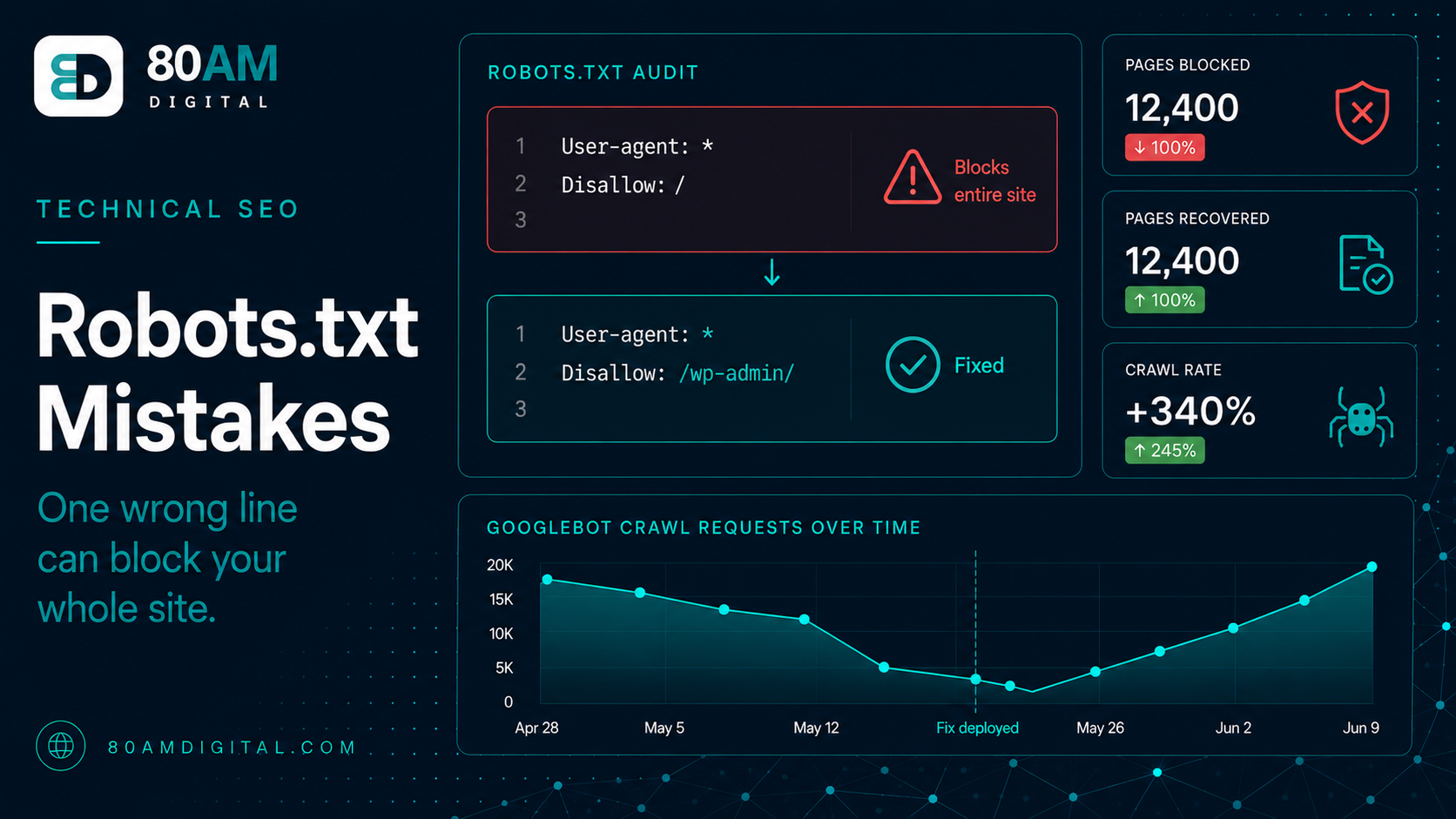
The most severe mistake. A robots.txt containing:
User-agent: *
Disallow: /
…blocks all crawlers from accessing any page on the site. This is correct in development (you don’t want staging indexed). It’s a disaster when copied to production during a launch. Google won’t crawl or re-crawl anything, and pages already indexed may drop out of the index within days as Google can no longer verify they still exist.
Check: visit yourdomain.com/robots.txt immediately after any site migration or platform change. If you see Disallow: / under User-agent: *, fix it immediately.
Mistake 2: Blocking CSS or JavaScript files
Google renders pages to understand them — including executing JavaScript and loading CSS. If your robots.txt blocks Google’s access to /wp-content/, /assets/, or specific JS and CSS files, Google can’t fully render your pages. It may see a stripped-down version of your content and conclude the page is thin or poorly structured.
This was a common mistake on WordPress sites that used to block /wp-content/ to prevent resource scraping. Modern best practice: allow Google to access all CSS and JavaScript files needed to render your pages. Only block directories that contain genuinely private or duplicate content.
Mistake 3: Disallowing URLs that should be indexed
Robots.txt directives are path-based. A rule like Disallow: /product blocks any URL that starts with /product — including /products/, /product-reviews/, and /product-category/. Overly broad path matching blocks pages that were never intended to be blocked.
Check each disallow rule by asking: does this path match any URL I want Google to crawl? Trailing slashes matter — Disallow: /product/ only blocks URLs that start with exactly /product/, while Disallow: /product (no trailing slash) catches anything starting with those characters.
Mistake 4: Thinking robots.txt prevents indexation
Robots.txt blocks crawling, not indexing. If a URL is blocked in robots.txt but has external links pointing to it, Google can still index it — it just can’t crawl it. Google will index the URL as a “known URL” based on the external link signals, showing it in the SERP with limited information (since it can’t access the page content).
If you need to prevent a page from being indexed, a noindex tag in the page’s HTML is the correct tool — but Google can only read that tag if it can crawl the page, which means the page cannot be blocked in robots.txt. The correct combination for “don’t block crawling, don’t index”: allow crawling + noindex meta tag. The combination “block crawling, also add noindex” is contradictory and unreliable.
Mistake 5: Blocking the sitemap or key admin paths
Robots.txt should include your sitemap location:
Sitemap: https://yourdomain.com/sitemap.xmlAccidentally blocking the path where your sitemap lives (/sitemap.xml or /sitemap_index.xml) prevents Google from fetching it. Similarly, if your WordPress installation uses paths like /wp-json/ for structured data queries, blocking those can affect how third-party tools access your site.
For the full technical audit framework, see the SEO audit checklist.
How to check your robots.txt
Google Search Console has a robots.txt tester (under Settings → Robots.txt). Paste specific URLs you care about and confirm they’re allowed for Googlebot. This is the most direct way to verify that your important pages aren’t accidentally blocked. Also check the robots.txt file directly (yourdomain.com/robots.txt) after any migration, redesign, or CMS update — these are the moments when accidental changes most often appear.
What “clean” looks like for most WordPress sites
/wp-admin/ and /wp-includes/ — everything else should generally stay open.A worked example: a staging file that shipped to production
A company replatformed its marketing site over a weekend, moving from an older CMS to a new headless setup. The launch went smoothly from a visual standpoint — design, content, and navigation all matched the staging environment exactly, because the deployment pipeline copied the staging build directly to production, file for file. Nobody thought to check robots.txt specifically, since it wasn’t part of the visual QA checklist.
Eleven days later, organic traffic had fallen by roughly 70%. Search Console’s Coverage report showed thousands of pages newly listed under “Indexed, though blocked by robots.txt” and “Discovered, currently not indexed.” The cause: the staging environment’s Disallow: / rule had been deployed to production along with everything else and sat there undetected because the site still looked and functioned normally to human visitors — only Googlebot was affected. Removing the line and requesting re-indexing of key pages began recovery, but full reindexation took close to three weeks, and the eleven days of full blocking caused a deeper traffic dip than a less severe technical issue would have.
Frequently asked questions
A file worth five minutes of attention
Robots.txt is small and rarely needs to change. But it’s worth checking after every migration, platform update, or major site change — because the cost of a blocking mistake is immediate and significant. Five minutes to verify the file is correct is an easy trade against the risk of accidentally blocking Googlebot from your entire site.
If you’d like your robots.txt reviewed alongside a broader technical audit, get in touch.